
NovelBar-Your Reading Haven
Q- VOR PTE. LTD.Books & Reference
3.5831.00 Reviews
- Version
- 2.2.2
- Installs
- 500.00K
- Age Rating
- Teen
Screenshots
Our Review of NovelBar-Your Reading Haven
 Analysis by Appyee
When I read on a phone, comfort is not just about the words on the screen. I need to find a story without much hunting, make the text manageable for the moment, and avoid losing my place when life interrupts. NovelBar-Your Reading Haven is a novels app from Q- VOR PTE. LTD., and its appeal is the idea of keeping a broad mix of fiction close at hand. In my view, it is most promising for readers who like browsing new stories and want reading to fit into small gaps in the day, though a few practical details are worth checking before making it a regular habit.
Finding a comfortable way into a story
I look first at whether a reading app makes the route from browsing to a comfortable page feel manageable, especially when I have only a few minutes to spare. NovelBar brings novel discovery and reading together, so I’d use this section to consider how its reading options and navigation might fit different preferences, while keeping personal comfort—not assumptions about accessibility—at the center.
Readability and navigation
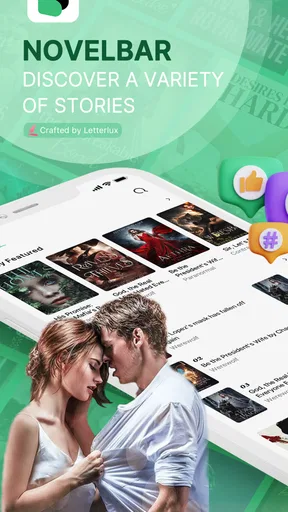
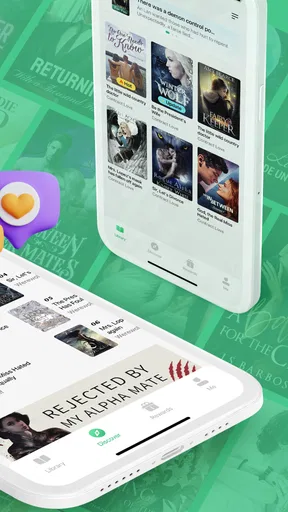
For a reading app, the most useful measure of navigation is how quickly I can move from “I have a few minutes” to a story that suits my mood. NovelBar is intended to bring novels across different genres together, which makes browsing part of the experience rather than treating the app like a single-book shelf. That can be a real advantage when I want to compare a few possibilities before committing to one.
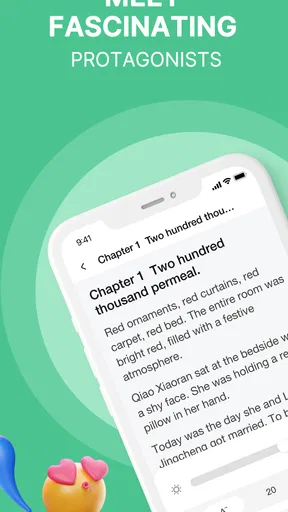
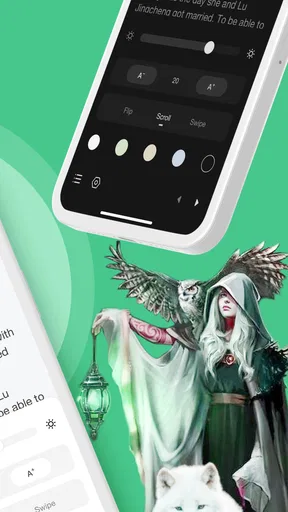
The published review describes adjustable font size, background color, and a dark mode. Those options matter because reading conditions change: a smaller screen may call for larger type, while a bright page can feel harsh when I am winding down. I would start by changing one setting at a time and reading a few paragraphs before settling on a combination. That makes it easier to tell whether a change actually helps, instead of adjusting everything and then struggling to remember what felt comfortable.
Browsing recommendations can also be a useful shortcut, but I would treat them as suggestions rather than a complete picture of the catalog. If a recommendation catches my eye, I would use it as a starting point, then look for another story or genre that contrasts with it. That small habit helps keep a feed from becoming the only route to something new. With an average rating of 3.6 from around 3.1 thousand ratings, readers’ experiences appear mixed enough that I would try the app myself before assuming its browsing and reading flow will suit everyone.
Motor and sensory considerations
Phone reading asks for repeated taps and scrolling, so I pay attention to whether a session can be kept simple. A practical approach is to choose a novel before settling into a commute or a break, rather than doing lots of searching while walking or managing other tasks. Once I am reading, fewer interruptions mean less repeated navigation and less effort spent finding my place again.
Text-size and background choices can help make a page more comfortable, but they are not a substitute for every accessibility need. I would check the actual reading screen on my own device, especially if I rely on a particular contrast level, larger text, a screen reader, or other system-level assistance. An option being available in an app does not automatically mean every part of its menus and book pages will work equally well with every setup.
There is a useful trade-off here: a phone makes it easy to carry several novels without carrying physical books, but a small screen can still be tiring during a long session. I would use NovelBar for a chapter while waiting or for a short evening read, then switch to a larger display or print when extended reading feels uncomfortable. The best format is the one that lets me keep enjoying the story without pushing through eye strain or hand fatigue.
Situational access: at home, on the move, and offline
Offline reading is presented as a feature, and it is especially useful when I expect a weak connection. Before leaving home, I would open the novel I plan to read and make sure it is available for offline use; that quick check is more reliable than discovering a problem after boarding a train or entering an area with poor reception. It also makes the app easier to use during a short break where I do not want to spend the first few minutes waiting for a page to load.
A realistic routine might be to browse after dinner, choose one story for the next day, and then read a few pages during a lunch break. That separates the decision-heavy part—finding something appealing—from the actual reading session. For someone who gets distracted by endless browsing, setting a simple intention such as “one chapter, then stop” can make a large selection feel more manageable rather than overwhelming.
NovelBar is free to download, but it includes in-app purchases ranging from $0.99 to $284.99 per item. I would check the price shown for any purchase before confirming it and decide what I am comfortable spending in advance. If I mainly want a no-cost way to sample novels, I would begin with the free experience and avoid treating a tempting story or locked item as an automatic reason to pay.
What to expect from the library and the alternatives
The app is listed in Books & Reference, is rated Teen, and has reached over 500 thousand installs. It was released on August 31, 2023, and version 2.0.4 is the current version described here; Android support starts at version 6.0. Those details make it easier to judge whether it is relevant to your device and reading preferences, but the Teen rating is not a promise that every story will match an individual reader’s comfort level. I would still use my own judgment about what to open, particularly when sharing a device with a younger reader.
Compared with a general ebook reader, NovelBar is more clearly oriented around discovering and reading novels in one app. That can suit someone who enjoys finding their next serial or genre read without managing a personal collection of files. A conventional ebook library may be a better fit if your priority is bringing books you already own together, keeping a carefully organized personal shelf, or reading a particular title you know you want. If you mostly borrow books through a local library or prefer print, those routes may serve you better than adding another reading catalog.
One practical tip is to judge the app by a complete small session, not just the first screen: find a story, read for a little while, leave the app, and return later. That reveals whether the overall routine suits you—browsing, reading, and picking up again—without assuming that a polished discovery screen tells the whole story. If you are choosing between several reading apps, compare the titles you actually want and the way each handles your preferred reading habits, rather than choosing on genre labels alone.
Remaining barriers and who may want another option
NovelBar’s broad novel focus is also a boundary. It is not the obvious choice if what you need is a reference work, a nonfiction research library, or a place to manage an existing collection. Readers who prefer to know exactly which book they are getting may also find recommendation-led discovery less useful than a shop, library catalog, or reader they already trust.
There are other points I would verify through ordinary use. A listed offline option is valuable, but I would test a selected book before relying on it away from a connection. I would also check whether the page controls remain comfortable during a longer read, rather than judging them after only a few taps. These are small checks, but they answer the questions that matter more than a general promise of convenience: can I read where I need to, and does the interface feel comfortable to me?
The 735 written reviews alongside the rating give prospective readers more user feedback to consult, though opinions can reflect different tastes, devices, and expectations. I would look for comments that describe a reading situation similar to mine rather than relying on a single strong reaction. The app may be a pleasant fit for one reader who likes casual discovery and a poor match for another who wants a very specific title or a carefully controlled library.
My take on inclusive everyday reading
All in all, NovelBar is worth considering if you want a phone-based place to explore novels and value options such as text-size and background adjustments. I would approach it as a flexible reading companion, not assume it replaces every ebook, library, or accessibility tool. Its strongest case is for readers who enjoy sampling fiction in short sessions and are willing to check the reading controls against their own needs.
If you need highly predictable navigation, a particular assistive setup, or a catalog centered on books you already own, I would compare alternatives before settling in. If your priority is finding a story for a commute, a quiet break, or a few pages before bed, I would try a short session and see whether the combination of discovery and reading feels natural. The app is free to install, carries a Teen content rating, and offers purchases within the app, so I would keep spending decisions separate from the simple question of whether its reading experience works for me.
Getting Started
Installing the app is as smooth as butter. Available on both iOS and Android, you just download, sign up, and boom—you're ready to explore. The setup process is quick, requiring only a few taps to get going. Once you're in, the homepage greets you with a plethora of book recommendations tailored to your taste. It's like having a personal librarian in your pocket!
Features That Stand Out
One of the things that really blew me away is how interactive the app feels. Let's break down some of the standout features:
- Personalized Recommendations: Based on your reading history, NovelBar curates a list of books you'll probably love. It's scary accurate; I found myself adding more books to my list than I can count!
- Offline Reading: This is a game-changer. Download your favorite novels and read them anywhere, anytime, without worrying about internet connectivity.
- Customizable Reading Experience: Adjust font size, background color, and even switch to dark mode to create a comfortable reading environment.
- Community Features: Join discussions, leave reviews, and connect with other readers—because we all know a good book is even better when shared.
Reading Experience
The reading experience on NovelBar is nothing short of delightful. The text is crisp and clear, and the app's smooth navigation makes flipping through pages effortless. I particularly love the "Reading Streaks" feature, which keeps track of how many days in a row you've read. It's a fun little motivator that has surprisingly kept me more consistent in my reading habits.
Pricing and Availability
While the app is free to download, it does offer a premium subscription for those looking to unlock additional features. The subscription gives you access to an ad-free experience, early access to new releases, and exclusive content. Personally, I find the free version quite robust, but the premium perks are certainly tempting for avid readers.
My Final Thoughts
All in all, NovelBar-Your Reading Haven is a fantastic app for anyone looking to immerse themselves in the world of literature. Its extensive library, combined with user-friendly features, makes it a must-have for book enthusiasts. Whether you're a casual reader or a hardcore bibliophile, NovelBar has something special to offer. So go ahead, give it a try—your next great read is just a download away!
Ready to dive into the world of novels with NovelBar? You can download it from the App Store or Google Play and start your reading adventure today.
Verdict
Strengths of NovelBar-Your Reading Haven
- Wide variety of genres available.
- User-friendly interface design.
- Offline reading mode supported.
- Customizable font and themes.
- Regular updates with new content.
Limitations of NovelBar-Your Reading Haven
- In-app purchases can be costly.
- Ads may interrupt reading experience.
- Limited free content available.
- Requires internet for updates.
- No audiobook feature available.
Other Releases by Q- VOR PTE. LTD.
View All
Novellair-Your Book Nook
Books & Reference3.3
Similar Picks in This Category
View All
Google Play Books & Audiobooks
Google LLC4.7

네이버 - NAVER
NAVER Corp.3.5

Wattpad - Read & Write Stories
Wattpad.com3.7

King James Bible - Verse+Audio
Ozion4.8

Bible Offline-KJV Holy Bible
Bíblia Offline4.9

Amazon Kindle: Reading App
Amazon Mobile LLC4.8
Frequently Asked Questions
What is NovelBar and what features does it offer?
NovelBar is a comprehensive reading app designed for book enthusiasts. It offers a wide range of novels across various genres, including romance, fantasy, and mystery. Users can customize their reading experience with adjustable font sizes, backgrounds, and a night mode. Additionally, NovelBar provides offline reading capabilities, allowing users to enjoy their books without an internet connection.
Is NovelBar free to use or are there in-app purchases?
NovelBar is free to download and offers a selection of free novels. However, it also includes in-app purchases for premium content. Users can opt to buy individual books or subscribe for unlimited access to the entire library. This subscription model provides an ad-free experience and exclusive early access to new releases.
Can I read offline with NovelBar, and how do I download books for offline reading?
Yes, NovelBar supports offline reading. To download a book for offline use, simply select the desired novel and tap the download button. Once downloaded, the book will be accessible in your library without an internet connection, ensuring that you can enjoy your reading anywhere, anytime.
How does NovelBar handle user privacy and data security?
NovelBar prioritizes user privacy and data security. The app requires minimal personal information for account creation and employs encryption to protect user data. NovelBar does not share personal information with third parties without user consent, and users can manage their privacy settings within the app to control data sharing preferences.
What devices and platforms support NovelBar?
NovelBar is available on both Android and iOS platforms. It supports a wide range of devices, including smartphones and tablets. Users can download the app from the Google Play Store for Android devices and the App Store for iOS devices. Regular updates ensure compatibility with the latest operating systems and devices.
